
100% Free Procurement Software
Catalystk is free online procurement software that runs your entire purchase-to-pay cycle — from purchase requisition and RFQ to supplier quote comparison, purchase order, goods receipt and payment. Built for small businesses, it brings purchase management, inventory management, vendor management, multi-level approvals and multi-currency together, entirely online, on web and mobile.
Key features of Procurement Software
Purchase requisition
Raise and approve internal purchase requests (indents) before any order is placed.
RFQ to vendors
Send requests for quotation to multiple vendors and compare their quotes side by side.
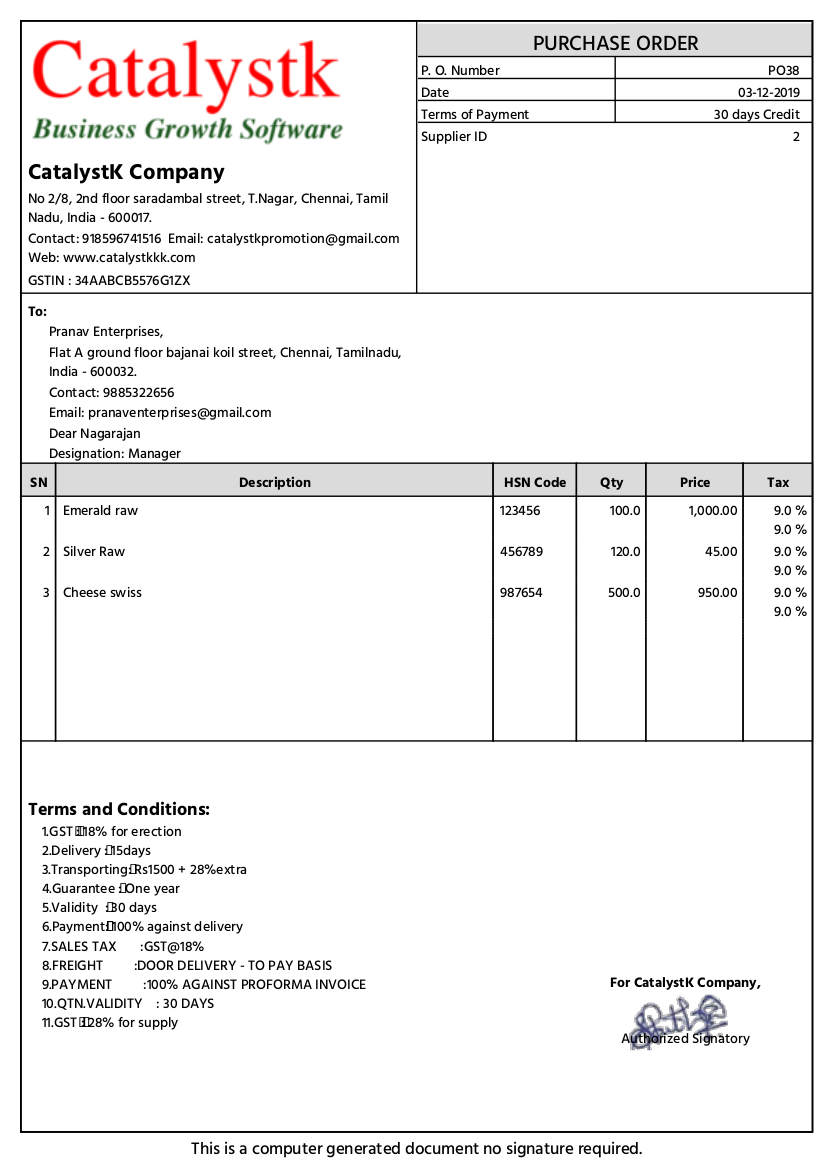
Purchase orders
Create multi-currency POs with items, taxes, charges and approval status.
Goods receipt (GRN)
Receive goods against a PO — the record locks once goods are received.
Purchase invoice & payments
Convert POs into supplier invoices and track paid, balance and return amounts.
Vendor management
Maintain suppliers, contacts, addresses, terms and full purchase history.
Multi-currency & GST taxes
Transact in any vendor's currency with automatic per-line tax breakup.
Approvals & status
Route every document through custom workflow statuses with notifications and audit trail.
Connected & online
Linked to inventory, sales and MRP, and reachable from any browser or the mobile app.
What is Catalystk procurement software?
Catalystk is free procurement software for small businesses that brings your whole buying process into one online system. Your team raises a purchase request, approvers review it, and suppliers send prices through a link. You compare their quotes, award the best one and create the purchase order in one click. Goods receipts then update your stock, so purchasing and inventory stay in step.
How the procurement process works
Each step carries forward from the one before it, from the first request to the final payment.
- 1
Purchase request
Your team raises a request for the items it needs.
- 2
Approval
The request moves through your multi-level approval flow.
- 3
RFQ
Send the RFQ to your suppliers as a link. They don’t need to log in.
- 4
Compare quotes
See every supplier and quote round side by side.
- 5
Finalise the supplier
Award each line, or all lines, to the supplier you choose.
- 6
Purchase order
Create the PO in one click for the awarded supplier.
- 7
Goods receipt (GRN)
Record what arrived. Saving the GRN updates your stock.
- 8
Invoice and payment
Enter the purchase invoice and track paid and balance amounts.
Free purchase management software
Purchase management gets harder when requests, orders and receipts sit in email, spreadsheets and paper files. In Catalystk, every record stays connected, so an approved request becomes an order without retyping and you can see where each purchase stands.
- Raise and approve requests with purchase requisitions.
- Create orders with free purchase order software, and track each PO until it’s delivered.
- Record deliveries with goods received notes.
- Download purchase requests, RFQs, POs, GRN, invoices and inventory in Excel and PDF.
See purchase management software for more on this module.
Free procurement management software
Catalystk is free procurement management software for one user. Requests, approvals, supplier selection and purchase orders are managed in one system, so you can see what has been requested, what is waiting for approval and which supplier was awarded each line. See procurement management software for how this works for small businesses.
Compare supplier quotes and award the best one
Choosing a supplier shouldn’t mean chasing prices by phone and copying them into a spreadsheet. Catalystk collects them for you and shows them on one screen, called supplier identification.
- Send your RFQ to suppliers as a link. They don’t need to log in.
- Suppliers enter their prices on the link, and each one is captured for you.
- Compare every supplier and quote round side by side on the supplier identification screen.
- Award each line, or all lines, to the supplier you choose.
- Create the PO in one click. If you award lines to two suppliers, each gets their own PO.
Each quote can include the price, discount, free quantity, brand and any alternate item the supplier offers. Earlier rounds are kept when a supplier sends a new quote, and you can download the comparison. Learn more about free RFQ software.
Multi-level purchase approval
Control what your business buys before any order goes out. Turn on purchase approval, and each request goes through your approval levels. Approvers can approve or reject it, and the status shows on the record.
The approval flow is included on the Free plan. Approval works best with more than one person, so you get the full benefit with multiple users, and additional users need a paid plan. See purchase approval software for more.
Procurement with inventory management
Buying and stock work from the same records. When goods arrive, saving the GRN increases stock by the received and free quantity, so your inventory reflects what you actually received.
Alerts reach your team by notification and email, and you can download inventory in Excel and PDF. See purchase order and inventory management for how the two connect.
What’s included in the free plan
All of Catalystk is free for one user, including procurement.
| Included | Details |
|---|---|
| Users | Free for one user. Additional users need a paid plan. |
| Purchasing | Purchase requests, RFQs, purchase orders, GRN and purchase invoices |
| Supplier selection | Supplier links with no login, quote comparison and awards |
| Approvals | Multi-level approval flow included. You get the full benefit with multiple users. |
| Inventory | Stock updates from GRN, with alerts by notification and email |
| Downloads | Excel and PDF |
| Storage | 100 MB for uploaded images and attachments |
| Support | Self-service with self training |
Need more users or storage? See pricing
What to check before choosing procurement software
Free plans differ, so check these points before you move your suppliers and purchase records.
| What to check | Catalystk |
|---|---|
| What does it cost, and for how many users? | Free for one user. Additional users need a paid plan. |
| Can you compare supplier quotes in one screen? | Yes, across every supplier and quote round |
| Do suppliers need an account to send prices? | No. They enter prices through a link, with no login. |
| Can an order be split between suppliers? | Yes. Award by line, and each supplier gets their own PO. |
| Does approval support more than one level? | Yes, multi-level approval |
| Does receiving goods update stock? | Yes. Saving a GRN updates stock. |
| Can you take your records out? | Yes, as Excel and PDF downloads |
| Do you need to install anything? | No. It runs in your browser and on the mobile app. |
How-to guides
Procurement Software — frequently asked questions
Is Catalystk free online procurement software?
Yes. Catalystk is 100% free online procurement software — run your whole purchase-to-pay cycle in your browser or on mobile, with nothing to install.
What does procurement software cover?
The full purchase-to-pay cycle: purchase requisition → RFQ → purchase order → goods receipt (GRN) → purchase invoice → payment, with vendor management throughout.
Does it handle vendors, approvals and multi-currency?
Yes. It manages suppliers, routes documents through approval statuses, and supports any currency with automatic GST/tax breakup.
Is it connected to inventory and sales?
Yes. Procurement links to inventory, MRP and sales orders so buying, stock and demand stay in sync.
Is there free procurement software for small business?
Yes. Catalystk is free procurement software for small businesses. All of it is free for one user, including purchase requests, RFQs, supplier quote comparison, purchase orders, GRN, invoices and inventory. Additional users need a paid plan.
Is there free procurement management software?
Yes. Catalystk is free procurement management software for one user, covering purchase requests, approvals, supplier quote comparison, purchase orders, GRN, invoices and inventory. Additional users need a paid plan.
Can I download this procurement software for free?
Catalystk runs online, so there’s nothing to install on your computer. You can use it for free in your browser or on the mobile app, and download your purchase records in Excel and PDF.
Do suppliers need to log in to send a quote?
No. You send your RFQ as a link, and suppliers enter their prices without logging in.
How do I compare supplier quotes and create the purchase order?
Open the supplier identification screen to see every supplier and quote round side by side. Award each line, or all lines, then create the PO in one click. If you award lines to two suppliers, each gets their own PO.
Does it support multi-level purchase approval?
Yes. The multi-level approval flow is included on the Free plan. You get the full benefit with multiple users, and additional users need a paid plan.
Does a GRN update stock and send alerts?
Yes. Saving a GRN increases stock by the received and free quantity, and alerts can be sent by notification and email.
Related products
Ready to run your business on one platform?
Join thousands of growing businesses using Catalystk. Set up in minutes — free forever, no credit card required.