
Skip to content
Unlimited purchase orders — no registration

Free online purchase order generator & purchase order maker

Raise a professional purchase order for your supplier in minutes and download it as a PDF. Add your company and logo, the vendor's details and tax number, the delivery address and required-by date, then list the items with quantities, rates and tax. It is a purchase order generator, a PO maker and a purchase order creator in one page — a ready PO format, unlimited orders, no sign-up.

  • Ready PO format
  • Vendor & deliver-to addresses
  • Required-by date
  • Prepared by / approved by
  • Download as PDF
  • No registration
Free online purchase order generator — PO format created with the Catalystk purchase order maker

Fill the form below and print your purchase order. With a free Catalystk account you also keep every document against the customer, resend or revise it in seconds, and move it through to payment — free forever, no credit card.

Sign up free
1

Your company

Logo, address and tax number (GSTIN, VAT No., TRN…) printed on the purchase order letterhead.

2

Vendor / supplier details

Who you are ordering from, with their tax number, state and country.

3

Document details

Number, dates, currency, tax regime for any country and document colour.

This document will charge CGST + SGST at the rate you set on each line item.

Document colour
4

Products & services

Every line calculates quantity × rate, discount and tax automatically.

Item 1
Click to add — shown on the document

Taxable ₹0.00 · Tax ₹0.00 · Total ₹0.00

Item 2
Click to add — shown on the document

Taxable ₹0.00 · Tax ₹0.00 · Total ₹0.00

Taxable value₹0.00
CGST + SGST₹0.00
Grand total₹0.00
5

Payment, terms & signature

Printed at the bottom of the purchase order — bank details first, then the terms & conditions.

Grand total

₹0.00

How it works

Four steps, start to print

No account, no installation and no learning curve — fill the form on the left and watch the document build itself on the right.

  1. 1

    Add your company

    You are the buyer here. Add your logo, address, state and tax number — they print as the letterhead at the top of the PO.

  2. 2

    Enter the vendor

    Add the supplier's name, address, tax number and state, plus the deliver-to address for where the goods must arrive.

  3. 3

    List what you are ordering

    Add each item with a photo, specification, HSN/SAC code, quantity, unit, rate and tax. Set the required-by date and delivery terms.

  4. 4

    Approve, save & print

    Add the prepared-by and approved-by names, then save and print — choose 'Save as PDF' in the print dialog to email it to the vendor.

Everything included

Built for the details that break a template

Discounts, tax splits, freight, round-off and amount-in-words — calculated for you, every time.

Buyer-side layout

Your company is the letterhead and the supplier is the addressee, with a separate deliver-to block — the way a purchase order is actually read.

A complete PO format

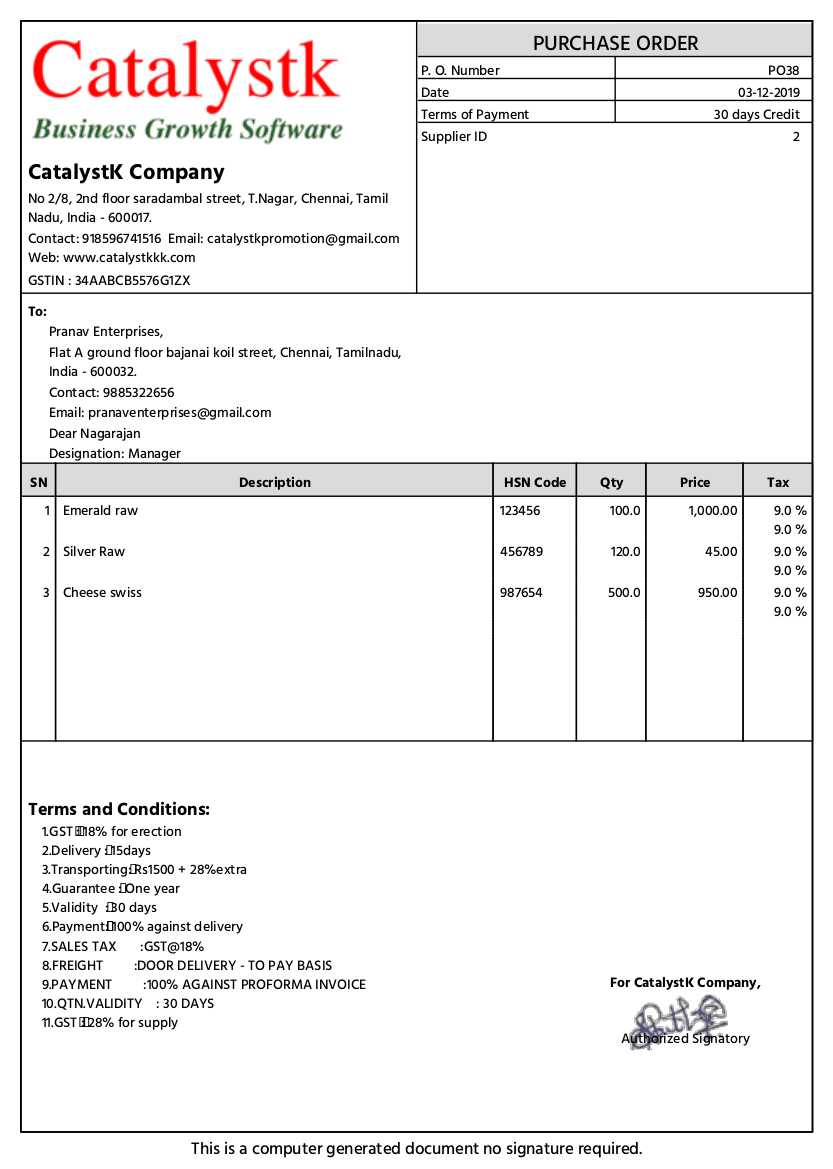
PO number, PO date, required-by date, vendor and delivery addresses, item table, tax summary, delivery terms, terms & conditions and two signatures.

Prepared by & approved by

Two signature blocks so the PO carries an authorisation trail before it goes to the supplier.

Specify exactly what you want

A photo, a multi-line specification and an HSN/SAC code per item, so the supplier ships the right thing.

Any country's tax

Indian GST with CGST + SGST or IGST, VAT, sales tax or none — any rate, in any of 12 currencies.

Unlimited, no sign-up

Raise as many purchase orders as you need. No account, no cap, no watermark.

The purchase order format — what a professional PO includes

A purchase order is the buyer's written commitment to buy, so it has to be unambiguous. This generator lays the PO format out for you and fills the calculations, which is the part a downloadable template leaves to you.

  • Buyer letterhead with logo, address and tax number
  • PO number and PO date, plus the required-by date
  • Vendor / supplier block and a separate deliver-to address
  • Item table: description, specification, HSN/SAC, qty, unit, rate, discount, tax
  • Tax summary, freight or packing charges, round-off and grand total in words
  • Delivery terms, terms & conditions, prepared-by and approved-by signatures

A purchase order maker, not just a fixed template

Everything on the document is editable. Change the title if your organisation calls it a Work Order or a Supply Order, rename the tax components to match your country, set the document colour, add your signature image and write your own terms. Your draft stays available, so the next PO to the same vendor starts from the last one rather than from a blank page.

Download the purchase order as a PDF

Click Save & print and choose 'Save as PDF' as the destination. You get a clean A4 PDF with 12 mm margins, ready to email to the supplier or attach to your procurement file. Only the purchase order prints — no navigation, buttons or watermark — and long item lists paginate with the table header repeating.

No purchase order generator software to download

There is nothing to install, license or update. The generator runs in any modern browser on Windows, macOS, Linux, Android or iOS, so you can raise a PO from the office or from a site visit. If you outgrow one-off documents, a free Catalystk account adds vendor records, PO approval workflow, delivery tracking and matching against the supplier's invoice.

Generator · maker · creator

Which one do you need?

Generator, maker, creator — three ways people describe the same need. This page covers all three: raise a PO in a minute, or shape the document until it matches your procurement paperwork.

Comparison of generator, maker and creator modes on this page
 GeneratorMakerCreator
What you wantA PO issued quicklyA PO that matches your paperworkFull control of every block
Typical timeUnder a minuteA few minutes, onceAs long as you like — the draft is kept
Document titlePurchase OrderWork Order, Supply Order — your wordingAny title, colour and logo
Item detailName, qty, rateSpecification and photo per itemHSN/SAC, unit, discount and tax per line
AuthorisationSingle signaturePrepared by and approved bySignature image and designation
DeliveryRequired-by dateDelivery terms and deliver-to addressCustom terms & conditions
RegistrationNoneNoneNone
Price / limitFree, unlimitedFree, unlimitedFree, unlimited
Who it's for

One document, every kind of business

Manufacturers

Order raw material and components against a BOM, with specifications under each line.

Traders & retailers

Replenish stock with clear quantities, rates and required-by dates for each supplier.

Contractors & site teams

Raise a PO from site with the delivery address of the project, not the head office.

Admin & procurement

Standardise how every department raises orders, with an approval name on every PO.

Next step

Keep every document — and connect it to the next one

This page creates a one-off document. A free Catalystk account keeps them against the customer or vendor and carries each one through to payment.

  • Save every purchase order against the vendor and track its status
  • Approval workflow — raise, approve and issue POs in one place
  • Track pending deliveries and partial receipts against each PO
  • Match PO, goods receipt and supplier invoice automatically
  • Purchase, inventory and accounting connected — no re-typing

₹0

Free forever plan · No credit card

Create a free account Log in
FAQ

Frequently asked questions

Is this purchase order generator really free?

Yes. Unlimited purchase orders, no registration, no watermark and nothing to pay. Catalystk's full purchase and inventory software is also free forever.

Do I need to download purchase order generator software?

No. There is nothing to install or license — it runs in any modern browser on desktop or mobile, so you can raise a PO wherever you are.

What should a purchase order format include?

Your company letterhead, a PO number and date, the required-by date, the vendor's details, the delivery address, an item table with quantities and rates, taxes, delivery terms, terms and conditions, and an authorised signature. This generator lays all of that out and calculates the totals.

How do I download the purchase order as a PDF?

Click Save & print and choose 'Save as PDF' as the destination in the print dialog. The PDF contains only the purchase order, ready to email to your supplier.

Can I add an approval signature to the PO?

Yes. The purchase order prints two signature blocks — prepared by and approved by — so the document carries an authorisation trail before it reaches the vendor.

Can the delivery address be different from my office address?

Yes. The deliver-to block is separate from your letterhead, so goods can be sent to a warehouse, a project site or a customer directly.

Does it handle GST on a purchase order?

Yes. Enter both tax numbers and states and the PO applies CGST + SGST within a state or IGST across states, with a rate-wise tax summary. VAT, sales tax and no-tax are supported for other countries.

What is the difference between a purchase order and an invoice?

A purchase order is issued by the buyer to order goods or services; an invoice is issued by the seller to ask for payment for what was supplied. Use the invoice generator for the seller side.

Catalystk is in beta. By using this tool you agree to our terms of use.

More free tools

Other documents you can create free

Related software & formats

Ready to run your business on one platform?

Join thousands of growing businesses using Catalystk. Set up in minutes — free forever, no credit card required.

WhatsApp