
Skip to content
Unlimited invoices — no registration

Free online invoice generator & free invoice maker

Create a professional, GST-ready invoice online in minutes and download it as a PDF. Add your logo, your company details with GSTIN or VAT number, the customer's billing and shipping address, your products with rates, discounts and tax, then record what has been paid and print the balance due. It is an invoice generator, an invoice maker and an invoice creator in one page — unlimited invoices, no sign-up, no watermark.

  • GST tax invoice ready
  • Print on your letterhead
  • Download as PDF
  • Amount paid & balance due
  • 12 currencies
  • No registration
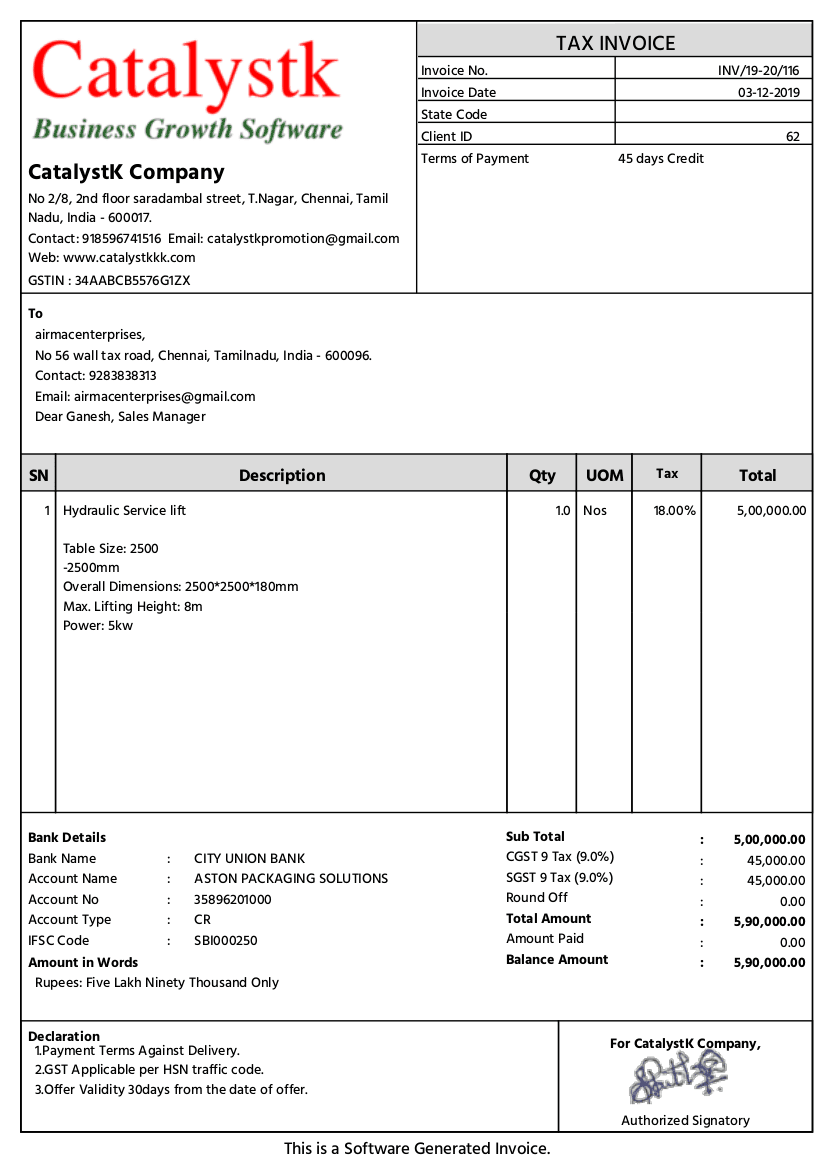
Free online invoice generator — GST tax invoice created with the Catalystk invoice maker

Fill the form below and print your tax invoice. With a free Catalystk account you also keep every document against the customer, resend or revise it in seconds, and move it through to payment — free forever, no credit card.

Sign up free
1

Your company

Logo, address and tax number (GSTIN, VAT No., TRN…) printed on the tax invoice letterhead.

2

Customer details

Who the invoice is billed to, with their tax number, state and country.

3

Document details

Number, dates, currency, tax regime for any country and document colour.

This document will charge CGST + SGST at the rate you set on each line item.

Document colour
4

Products & services

Every line calculates quantity × rate, discount and tax automatically.

Item 1
Click to add — shown on the document

Taxable ₹0.00 · Tax ₹0.00 · Total ₹0.00

Item 2
Click to add — shown on the document

Taxable ₹0.00 · Tax ₹0.00 · Total ₹0.00

Taxable value₹0.00
CGST + SGST₹0.00
Invoice total₹0.00
5

Payment, terms & signature

Printed at the bottom of the tax invoice — bank details first, then the terms & conditions.

Grand total

₹0.00

How it works

Four steps, start to print

No account, no installation and no learning curve — fill the form on the left and watch the document build itself on the right.

  1. 1

    Add your company

    Click the logo tile to add your logo, then fill in your address, state and tax number — GSTIN, VAT No., TRN or whatever your country uses.

  2. 2

    Enter the customer

    Add the billing address, shipping address, tax number and state. The tax treatment follows from the two states automatically.

  3. 3

    List what you are billing

    Add each product or service with a photo, description, HSN/SAC code, quantity, rate, discount and tax rate. Totals update as you type.

  4. 4

    Record payment, save & print

    Enter any amount already received to print the balance due, then save and print — choose 'Save as PDF' in the print dialog.

Everything included

Built for the details that break a template

Discounts, tax splits, freight, round-off and amount-in-words — calculated for you, every time.

A compliant tax invoice

GSTIN on both parties, HSN/SAC per line, CGST + SGST or IGST decided from the two states, a rate-wise tax summary and the amount in words.

Your logo & letterhead

Add a logo, pick from eight document colours and print the invoice on your own letterhead — branded from the first line.

Paid, due and balance

Enter the amount already received and the invoice prints the balance due, with the amount in words following the balance.

A photo for every product

Give each line item its own image so the customer sees exactly what they are being billed for.

Any country's tax

Indian GST, VAT, sales tax or none — rename the components and set any rate, in any of 12 currencies.

Unlimited, no sign-up

No account, no monthly cap and no watermark on the PDF. Create one invoice or five hundred.

A free GST invoice generator that produces a compliant tax invoice

Used in India, this doubles as a free GST invoice generator. Enter your GSTIN and the customer's, give each line an HSN or SAC code, and the invoice applies CGST + SGST when both parties are in the same state or IGST when they are not. The printed document carries the place of supply, a rate-wise tax summary and the total in words — the elements a GST tax invoice is expected to show.

  • GSTIN printed for supplier and recipient
  • HSN / SAC code against every line item
  • CGST + SGST within the state, IGST inter-state and for exports
  • Rate-wise tax summary table and amount in words

Free printable invoices — print on your letterhead

Upload your logo, choose the document colour and the invoice prints as a clean, letterhead-style A4 document with your company block at the top. Printing produces only the invoice: no website navigation, no buttons and no watermark. Print to paper for your file copy, or choose your PDF printer to keep a digital copy for the customer.

Download the invoice as a PDF

Click Save & print, then pick 'Save as PDF' (or 'Microsoft Print to PDF' on Windows) as the destination. You get an A4 PDF with 12 mm margins, ready to email or upload to a portal. Long invoices paginate cleanly, with the table header repeating on each page and no line item split across a page break.

An online invoice generator built for small business

There is no software to install and nothing to configure. Traders, manufacturers, service providers and freelancers can raise a correct invoice from any browser, on a laptop or a phone. When one-off invoicing is no longer enough, a free Catalystk account adds saved customers, invoice numbering, payment tracking and reminders — the difference between an invoice generator and full billing software.

Generator · maker · creator

Which one do you need?

Three names for slightly different jobs. Speed, control, or the whole document from scratch — this page does all three, and you decide how far to go.

Comparison of generator, maker and creator modes on this page
 GeneratorMakerCreator
What you wantA correct invoice, fastAn invoice that looks like your brandEvery part of the document under your control
Typical timeUnder a minuteA few minutes, onceAs long as you like — the draft is kept
BrandingOptionalLogo, colour and letterheadLogo, colour, document title, signature image
Line itemsName, qty, rate, taxPhotos and descriptions per productPhoto, multi-line description, HSN/SAC, unit, discount
TaxGST preset, ready to goVAT, sales tax or your own namesComponent names and rates fully editable
PaymentInvoice totalAmount paid and balance dueBank details, UPI and payment terms
RegistrationNoneNoneNone
Price / limitFree, unlimitedFree, unlimitedFree, unlimited
Who it's for

One document, every kind of business

Traders & distributors

Bill dozens of SKUs with HSN codes, per-line discounts and mixed GST slabs on one invoice.

Manufacturers

Invoice made-to-order jobs with specifications under each item, plus freight and packing charges.

Service providers

Bill services with SAC codes, hourly or monthly units and clear payment terms.

Exporters

Invoice overseas customers in their currency with IGST, zero tax or VAT and their own tax-number label.

Next step

Keep every document — and connect it to the next one

This page creates a one-off document. A free Catalystk account keeps them against the customer or vendor and carries each one through to payment.

  • Save every invoice against the customer with its payment status
  • Record part payments and see outstanding balances at a glance
  • Email, SMS or WhatsApp the invoice and send payment reminders
  • GST-ready invoicing with automatic tax and HSN summaries
  • Quotation → invoice → payment in one connected flow

₹0

Free forever plan · No credit card

Create a free account Log in
FAQ

Frequently asked questions

Is this free invoice generator really free?

Yes. It costs nothing, there is no cap on how many invoices you create, no registration and no watermark on the PDF. Catalystk's full billing software is also free forever.

Do I need to sign up to make an invoice?

No. Open the page, fill the form and print. An account is only needed if you want to save invoices against customers, track payments and send reminders.

Is this a free GST invoice generator?

Yes. Enter both GSTINs, add HSN or SAC codes to the line items and pick the states. The invoice applies CGST + SGST within a state and IGST across states, and prints the place of supply, a rate-wise tax summary and the amount in words.

How do I download the invoice as a PDF?

Click Save & print and choose 'Save as PDF' as the destination in the print dialog. The PDF contains only the invoice — no website menus, buttons or watermark.

Can I print the invoice on my company letterhead?

Yes. Add your logo and choose a document colour; the invoice prints as a letterhead-style A4 document with your company block at the top.

Can I show a part payment and the balance due?

Yes. Enter the amount already received in the items step and the invoice prints Amount paid and Balance due below the total, with the amount in words following the balance.

What is the difference between an invoice generator and an invoice maker?

A generator is about speed — fill the fields and print. A maker is about customisation — your logo, colours, product photos, your own tax names and terms. This page is both; start fast and customise as much as you want.

Can I use it for a proforma invoice or a quotation instead?

Use the dedicated tools: the proforma invoice generator for advance-payment documents and the quotation generator for quotes. Each prints the correct document title, dates and terms.

Catalystk is in beta. By using this tool you agree to our terms of use.

More free tools

Other documents you can create free

Related software & formats

Ready to run your business on one platform?

Join thousands of growing businesses using Catalystk. Set up in minutes — free forever, no credit card required.

WhatsApp